Tuesday, 3 September 2013

Benefits of marketing your brand on google plus


Marketing on the social media has become a common phenomenon in the recent times and every brand is utilizing the power of this domain to the fullest. Google and its derivatives are the most widely used social media websites across the world. To be recognized on these websites is something that no brand manager can ignore.

Google plus is one such community that is making social media marketing strategies easy and effective for users. In the recent times it has gained momentum and the number of people and brands using it has increased manifold. Google plus has a lot of advantages to provide to its users in terms of search engine support, good contacts and customers, impact social media presence and increased influence of brands on the audience.


The benefits of using Google plus are many, some of them are listed down below which will give you an insight to what Google plus can offer you.

1. Get found across Google

Google is by far the largest search engine known. It is prestigious for each brand to be able to rank on one of the Google pages.One of the biggest benefits offered is that creating an account on any of Google’s platform allows you to use the same account for other Google platforms as well. Being a Google derivative it adds a lot of value to the brand’s entity on the platform and increases the reach and frequency of the brand manifold. Google Plus is influential and helps your brand to be recognised better than any other platform.

2. Get face-to-face with customers

Users need credibility and accountability in a brand, when they are able to communicate with the brand representatives directly it adds on to the level of trust and belief in a brand. Google Plus takes you a step ahead in this respect. It allows brands to carry out video chats/conferences referred as “hangouts”. Such chats and conversations speak volumes about a brand’s loyalty towards the customers. Many brands are using this particular feature to help solve all issues and queries of users such that their trust and belief in the brand is maintained and the value of the brand is increased.
3. High Ranking on Google

As mentioned above ranking on Google is important and it makes brands viral when they reach the first few pages around a certain list of keywords. Mastering certain keywords and maintaining your rank on Google enables the brand to lure more traffic and bring in more better and useful results. Google gives preference to Google Plus pages which helps in ranking the pages better.

4. Link every platform

Google Plus is a tailor made platform for brands to market themselves.Every platform
can be linked to your account and thereafter be monitored from one place only. This
particular feature helps brands to keep all their content and data together and compiled. Every platform where the brand’s presence exists is updated from time to time. It increases the chances of a page going viral bringing in more traffic for the brand and influence the brands ranking on search engines making the work easier for SEO’s. All social media campaigns are highlighted at once on each and every platform that the brand is operating on.

5 Creative Mobile Marketing Tips for Startups


Getting your business started is no simple task. It takes a lot of preparation and hard work. Once you have it off the ground, the next step is to get your company noticed by consumers. Cellphones and the Internet have made it a necessity to have your startup easily accessible to people on the go. Here are a few tips to get your mobile marketing campaign started.

1. Know Your Target Market

No matter what direction you want to take in marketing, be it an app or an e-mail newsletter, you have to know who your audience is. A few simple ways to do this are having customers fill out a feedback form in-store or after online purchases. That way, you can get the exact demographics of your products and cater to their advertising senses.

2. Search Engine Optimization

According to a Google study, about 50% of smartphone users also use search engines at least once during the day. If you have your business tied to one of these search engines, you are allowing your company to be viewed by anyone searching for the goods or services you provide. This is a great way to get your name out there and at a minimum of cost.

3. QR Codes


Image via Flickr by swanksalot

A relatively recent phenomenon, QR codes are springing up at businesses everywhere. A QR code is a type of bar code that can be scanned using your smart phone that gives information regarding a certain product.

By adding this to your marketing materials either in-store or on packaging, you can give yourself another medium of advertising. Now, anyone that owns a smartphone, even with the new the new BlackBerry 10 operating system, can get a comprehensive report of your products.

4. Apps

Although some apps can be pricey, starting your mobile marketing with the simplest of apps is the best approach. By starting with an inexpensive or simple app, you can gauge the interest of potential clients as well as see if the app is of value to you and the customer.

Many online companies let you create apps with a drag-and-drop interface for the less tech-savvy. That way, you do not have be an IT guru to design your app, and you don’t have to outsource it, saving you money.

5. Don’t Rely Solely on Mobile Marketing

In an ideal setting, having a mobile marketing campaign as your only form of advertising would suffice. However, it should be used as a tool to give customers something else. If you incorporate offers that you don’t have in-store or on your website, having mobile marketing gives value to your customers. Remember that this marketing is just a portion of the marketing product.

If all else fails in your marketing approach, remember one easy saying, “Mobile first, Internet second”. The advantage of implementing such a strategy is quite simple. As more people begin to use a smart phone as their primary device, the more important it becomes to steer your marketing for mobile consumers.

Benefits of Pinterest Marketing


There is so much traffic over the internet that most of the brand entities are lost in the rush. They fail to establish an identity for themselves. In this very respect, many such platforms are gaining momentum to participate in the rat race and sway away users from the functioning and crowded websites.

Platforms like Tumblr, Pinterest undoubtedly carry a lot of potential, with time users are realising the benefits and features that these social networking platforms can offer and are being lured towards them to a varied extent. According to a survey conducted on the social media, facebook is losing the charm it once held that attracted people towards it. Many new platforms have crept in with the dream of taking its place and you never know, they might just be successful.

Pinterest is definitely a website which has many valuable features to provide its users with pictures and images given the prime most concern here. Reports derived from comScore (an American Internet analytics company) says that by January 2012 Pinterest had 11.7 million users that increased to 25 million by the end of 2012. As per Reuters and comScore, in July 2013 the website had 70 million users and the count is still exceeding exponentially. Following are the reasons that portray how Pinterest is all ready to kill the traffic of all other platforms.

1. Visual Content

What pleases the eyes appeals to the mind itself. Pinterest’s biggest merit is the concept with which it is created. It consists of boards similar to bulletin boards where users can pin/upload images and pictures. This is one of the most effective and innovative feature that is offered to the users. Especially in the case of brand management, managers wish to showcase their products in a way that maximum interest is directed towards the pictures. No doubt, other platforms also allow uploading images but the attention shifts towards quality posts and comments rather than these pictures.

A pinterest board looks like this, here you can pin up images that pertain to your brand and eventually showcase all your products from which users can choose and select.  Giving much emphasis to pictures and images, Pinterest is ruling the social media marketing domain when it comes to showcasing of products effectively.


2. User Friendly

 This platform consists of unique features that adds on to the reasons that make it successful and different. Apart from that, it is easy to incorporate the features in your account. Creating boards and pinning images is a very easy task on Pinterest and requires no technical skills.


3. Apt for marketing

Brand are using the social media as the most impactful weapon to market the products and generate traffic. Pinterest allows status updates, posts, comments just like any other platform; Facebook Twitter etc but huge emphasis is laid on creating a board on Pinterest and correspondingly pinning up images. It creates a sort of online portal for the brand as all products are properly displayed with the price and other details in  description tab. The reach of such marketing tools is any day larger than that of simple posts and comments .

4. Demographics

If we take a close look at the statistical data presented below, we can easily analyse that Pinterest is growing at a faster rate. Daily sign ups are increasing and the platform is being preferred by users as it is giving them better mentions on the web, marketing is done easily. The number of visitors is increasing and the time spent by each individual is also large.


5.  Customer oriented

The platform has kept in mind the minutest details. Its founders have made sure that brand managers face no difficulties in marketing their brands over here. Whether it is seeding in the initial phases, generating traffic or gaining profits, all is easily done on this platform. Pinterest is designed in a way that its customers face no problems and nor do the users find it unfriendly to use.


Pinterest marketing is growing at a steady rate, in the short span of time it has garnered a lot of traffic and has brought into light some new brands. Moving at this pace, Pinterest is sure to attain great heights and may pose a serious threat to its competitors in the times to come.

Wednesday, 3 July 2013

75 Fascinating Social Media Facts and Figures of 2013

In this digital age, social media has become an important part of our daily life. Most of us check news feeds, posting tweets and do other social media activity before doing anything else in the morning. Social media have become the number one activity on web. Social media platforms initially may looked like it was created for keeping in touch with friends and family, but people have explored tremendous ways to use this platform. Companies/individual entered social media to expand and maintain their online reputation. Politicians, film stars, musicians, singer, sports persons or anybody for that matter have used these platforms to engage and expand. Last year it was around 1 billion people registered for social media, but in just 1st quarter of 2013 Facebook users have reached to 1.11 billion. Here we bring you more such interesting facts and figures about social media 2013.

Facebook Facts 2013

There are over 1.11 billion users of Facebook with 665 million daily active users
751 Million users access Facebook from mobile with 7,000 different devices
There over 10 million Facebook apps and
23% of Facebook user’s check their account more than 5 times a day
74% of marketers believe Facebook is important for their lead generation strategy
250 billion photos are uploaded every day and 300 million are via Instagram
Facebook is available in 70 different languages
1 out of every 7 minutes spent online is on Facebook
On Facebook, brand posts get half of their reach within 30 minutes of being posted
More than 250 million people are playing games on the social network every month
 Pages that get more than 1,000 likes gets nearly 1,400 website visit a day
Facebook is the top priority for 80% people to get connected to brand than any other social networking sites
 More than 210,000 videos have been played on Facebook
Twitter Facts 2013
14. There are over 500 million users of Twitter with 288 million monthly active users
15. 400 Million tweets were sent each day as of March 2013 (http://mashable.com/2013/03/21/happy-7th-birthday-twitter/)
16. Since last year Twitter encountered 44% of growth in active users
17. Every day 1 Million new accounts are registered and more than 11 every second
18. 92% of retweets are based on “interesting content” 28% are due to inclusion of “please RT!”
19. Barack Obama’s victory was the most retweeted tweet
20. Twitter is available in more than 25 different languages
21. Number of LadyGaga follower on Twitter is equal to the population of four New York Cities
22. Twitter’s fastest growing age demographic is 55 to 64 year olds with active users of 79%
23. Average of 200 million monthly active users with 400 million tweets sent per day
24. 60% of Twitter users access it from mobile
25. Approx 20 million user ids are fake
26. Pages that get more than 1,000 likes gets nearly 800 website visit a day

LinkedIn Facts 2013

27. There are over 225 million users of LinkedIn
28. 3 Million companies have created Company Pages to connect with professionals on LinkedIn (http://blog.linkedin.com/2013/06/27/3-million-linkedin-company-pages-infographic/)
29. 200 countries and territories have geographical reach of LinkedIn
30. For 61% users, LinkedIn is their primary professional social network site
31. Total number of LinkedIn groups are 1.5 million
32. 50% of LinkedIn users have their Bachelor’s or Graduate degree
33. 81% of users at least belong to one group
34. 42% update their profile information regularly
35. 75,000 developers are using LinkedIn’s API
36. LinkedIn has over 3700 employees
37. LinkedIn purchased Slideshare in $119 million
38. Two new users join LinkedIn every second

Pinterest Facts 2013

39. There are over 48.7 million users of Pinterest
40. Pinterest is heavily used by female users with 79%
41. Pinterest is the fastest growing social network than Facebook and Twitter
42. It is now third most popular social network after Facebook and Twitter in US
43. 80% of total Pinterest’s pins are repins
44. 9 million users have connected their Pinterest account to Facebook
45. Delicious is the most followed brand with 6.9 million followers
46. Garlic Cheesy Bread is the most repinned Pinterest Pin
47. Food is the top category on Pinterest with 57% discussing about food-related content
48. American users spend an average of 1 hour and 17 minutes on Pinterest

Google+ Facts 2013

49. There are over 500 million monthly active users of Google+
50. 625,000 people join Google+ every day
51. Google+ is male dominated social network with 67% male users
52. 80% users login at least once a week and 60% users login everyday
53. Every day a Google+1 button is served more than 5 billion times
54. 40% of marketers use Google+, 70% desire to learn more and 67% plan to increase Google+ activities.

Instagram Facts 2013

55. There are over 130 million monthly active users and 7.3 million daily active users.
56. Average number of photos per Instagram User is 40
57. MTV is the most followed brand with over 1.2 million followers
58. Instagram get over 8500 “Likes” per second
59. More than 5 Million photos uploaded every day on Instagram and 4 billon shared since beginning.

YouTube Facts 2013

60. There are over 1 billion unique monthly visitors
61. Every minute 700 YouTube videos are shared on Twitter
62. The figure of hours spent watching videos every month went up to 6 billion when compared 4 billion last year August
63. The interface of the YouTube is available with localized versions in 57 countries, one territory and a worldwide version.
64. “Gangnam Style” is the most watched video with over 1,675,854,966 views followed by Justin Beiber’s “Baby” with 869,389,608 views.

Others Social Media Facts
65. 4.2 billion people use mobile device to access social media sites
66. 15% of total US mobile web users spent time on social networks
67. Social media generates almost double the marketing leads of trade show, telemarketing, daily mail, or PPC
68. Last six months became more important to 21% of marketer on social media
69. Women check out a brand’s social page more often than men
70. 25% of social media users don’t bother to update their privacy settings
71. Users following brands on social media have increased to 106%
72. 23% of marketers are investing in blogging and social media this year
73. Around 46% of web users turn to social media for making purchase
74. 75% of people use social media to find or share information about brands
75. 60% consumer says the integration of social media makes them more likely to share.

Sources –

http://www.massrelevance.com/
https://corp.wishpond.com/
http://www.mediabistro.com/
http://expandedramblings.com
http://www.globalwebindex.net/
http://www.socialmediaexaminer.com

Thursday, 27 June 2013

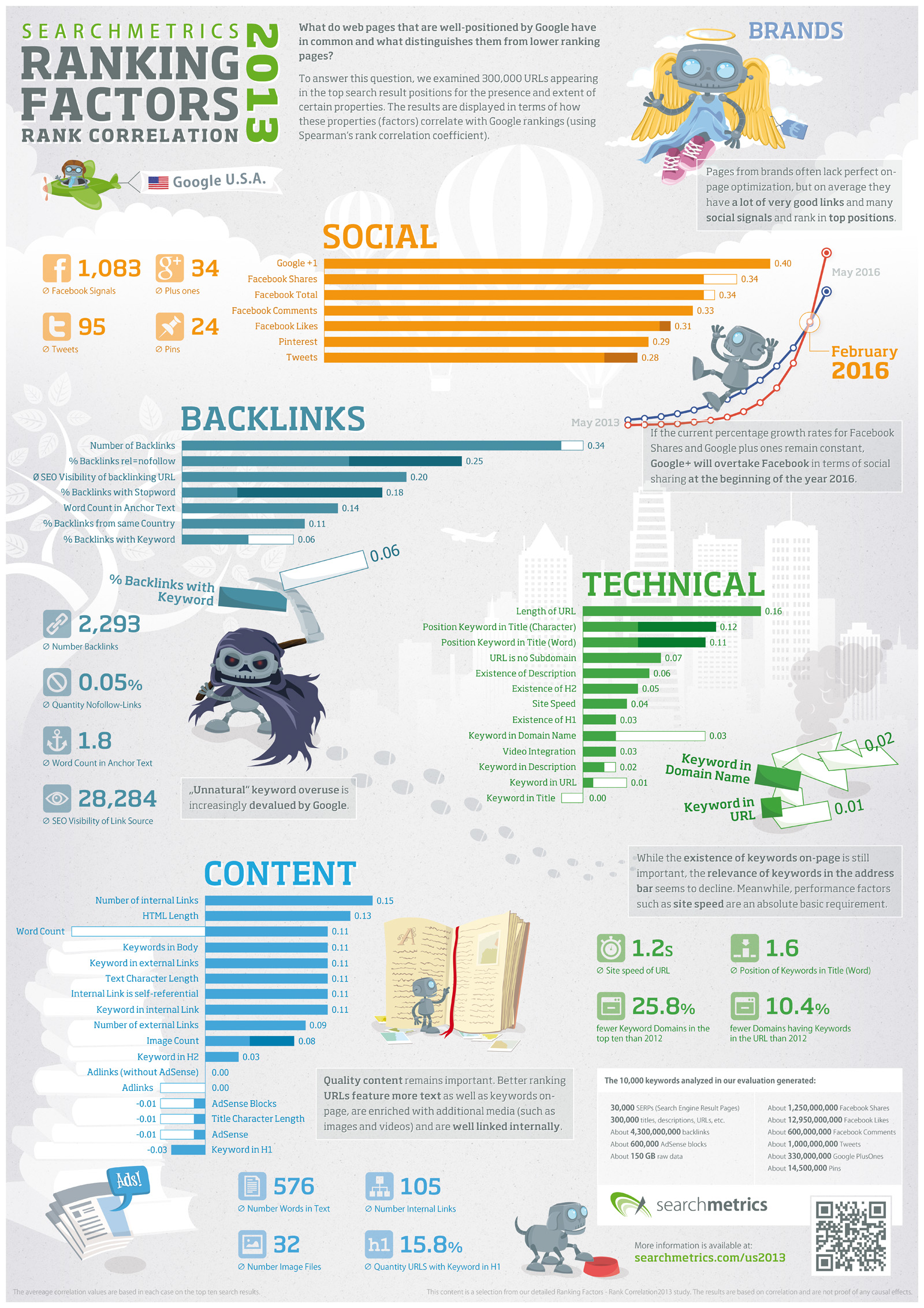
Infographic: 2013 SEO Ranking Factors, From SearchMetrics

The folks at SearchMetrics have released their SEO ranking factors for 2013. This is their ranking correlation study they worked on for the past 3-months, right after the second-generation Penguin update was pushed out by Google. Want to understand everything that was in it? They’ve got an infographic for that (click to enlarge):
us_ranking_factors_2013
The key takeaways from their study included:
  • Keyword domains and keyword links have lost relevance
  • Brands are the exception to many rules
  • Social signals continue to correlate very well with better rankings
  • Good content is always important: it comes down to quality
  • The number of backlinks remains immensely important
  • On-page technology remains one of the basics
There’s been some criticism around this study on social networks, but like with any ranking correlation study, there are always critiques, and there should be. You can download the study over here.
Also be sure to see our Periodic Table Of SEO Success Factors, which was freshly updated earlier this month, for our own take on ranking factors to consider.

Saturday, 22 June 2013

Should SEOs Redirect or Park For Geolocation?

Should SEOs Redirect or Park For Geolocation?
Geolocation is the process of associating a geographic area (usually a country) to a website or website page. This is done in order to help search engines provide results that are not only relevant to a searchers keyword, but also location.
For example, there are certain professions, like lawyers, that are restricted to geographic locations - a lawyer from Poland probably will not be helpful to a searcher in South Africa, regardless of how well the Polish lawyers website is optimized. Likewise, many people prefer to buy from vendors that are based in their own country - not only is shipping not as much of a concern, but local consumer protection laws are more likely to be helpful if their is a problem.

Definitions
ccTLD

This refers to Country Code Top Level Domain. Normal TLD's such as .com, .net, and .org refer to they type of website the domain belongs to (commercial, network, or organization), whereas a ccTLD refers to where the domain belongs - ie a country. Common examples include Canada (.ca) UK (.co.uk) France (.fr) and so forth. These codes are assigned by the Internet Assigned Numbers Authority (IANA).
Geolocation

The act of assigning a geographic location to a website or webpage.
ccLinks

Incoming back links (IBL's) that point from another website to yours, where that other website has a specific country code associated with it. For example, a link from a German website would be a ccLink, where a link from a normal .com with no country geolocated to it would be considered a normal link. If a site gets enough ccLinks related to a specific country pointing to it, it will often be assumed to be relevant to that country by some search engines.
IP Geolocation
In late 2003, I wrote a fairly well received article called "Only In Canada, Eh?" which outlined several issues and possible solutions regarding geolocation. However, it's now late 2005 and the article is starting to show it's age. The search engines have not stood still in the interim, and there are more rules to work with. A fairly complete discussion of the changes can be found at the High Rankings Forum in a thread called: "mcanerin - Only in Canada, Eh?". This article hopes to summarize that thread and to clarify some parts of it, especially related to redirects and parks.

The main conclusion of the original article was that it would be best to host your website on an IP address in your country. This allows Google to associate your website with a specific country easily, regardless of what it's domain extension is. This is still true today, but there are other considerations.

Other Search Engines Don't Use IP Geolocation
Google is the only major search engine currently that uses IP address for geolocation. The reason that Yahoo won't is quite simple - they know very well that many people host websites outside of their own country. As a matter of fact, Yahoo hosts websites from all over the world, and since it's IP's are US, following Google's IP focussed method would not accurately reflect the reality that Yahoo knows is going one. Likewise, the folks at ASK are well aware that the preferred hosting location for large Chinese websites is Japan. Google's IP fixation is apparently more due to a lack of experience outside of the US than an accurate reflection of the realities of web hosting in the rest of the world.
The non-Google search engines use 2 methods of discovering what area a web site is relevant to: 1) the ccTLD (Country Code Top Level Domain) and 2) link analysis - they assume that if a very large number of German websites link to you, that you must be relevant to Germans, regardless of your hosting location.

Geographic Metatags and GeoTags

A lot of people haven't heard of Gigablast, which is too bad, as it's a nice search engine. Gigablast is different from most search engines in that it actually indexes metatags, and lets you search for results using those metatags. It's the only major search engine that actually uses Geolocation Metatags, which look like this:
<meta name="zipcode"        content="87112,87113,87114">
<meta name="city"           content="albuquerque, abq, rio rancho">
<meta name="state"          content="new mexico">
<meta name="country"        content="usa, united states of america">

If you want to experiment with geographic metatags, you can use my free Metatag Generator to do so. There is another option called GeoTags, which actually incorporates latitude and longitude information, as well. Unfortunately, it's not well supported at all.

For now, geographic metatags don't work with the big 4 search engines, and I don't really expect that to change in the near future, so they are interesting, but not practical at this point.

ccLinks

Ok, I just made that term up. For the purposes of this discussion, ccLinks (Country Context Links) are incoming backlinks (IBL's) that the search engine in question considers to be relevant for a particular country. So, for example, if my webpage is considered by Yahoo to be a "Canadian" page, and I link to you, then Yahoo will receive a hint that you are of interest to a Canadian.

If Yahoo get's enough of these from other Canadian sites, they will eventually come to the conclusion that this site is somehow relevant to Canadians. Notice that it's not necessarily assuming that it's a Canadian site, but that Canadians would consider it relevant, which may be a better metric anyway.

So it's possible to get your .com, US hosted site considered to be relevant to the UK if you have enough UK relevant sites (ccLinks) pointing to it. This won't work on Google at this time, but does work on Yahoo, MSN and Ask. This of course can cause issues if you somehow buy/trade a whole bunch of links to your site from Russian link farms, of course.

Further, I believe from testing that each page can only have one country associated with it. In theory, you would have 20 pages on your site all considered belonging to 20 different countries. In theory. In practice, it's something to be cautious about while link building - you want to focus on ccLinks that are from your target country as much as possible. Which should be no surprise since presumably that's part of relevant link building.

ccTLD - The Most Accurate Method

Currently, the best way to make sure that a website is geolocated for a specific area is to make sure it has a ccTLD (Country Code Top Level Domain) for that location. For example, if you wanted to make sure that your website was considered relevant to Canadians, you would make sure that it had a .ca domain extension.

This works very well in all the search engines today, including Google. It's simple and clear.
But there are problems. First, many people already have a well-branded .com site. Second, some countries make it very difficult to get a domain appropriate to that country unless you are incorporated or a citizen there, which can be an issue if you are a multinational corporation, or a travel company that is from the destination location but is marketing to the users location.

So What's This Have To Do With Redirects?
Good question. The answer is that one of the most common use for domain redirects is geolocation using ccTLD's. If you have a .com and want to show up as a country specific site, your best and easiest method of doing so is to use a ccTLD and associating it with the .com website. You can do this by using redirects. I will use .com as the example from now on, but the information below also refers to .net, .org, and other non-country specific domains.

Geolocation is one of the few instances where I recommend a 302 or park instead of a 301.
Scenario 1
I have an existing .com site and I just bought a ccTLD. I want to have the .com website associated with that country.

Answer 1: Use a 302 redirect from the ccTLD to the .com. Create a second account and point the ccTLD to it. Then redirect using a 302 from that account to the .com account.
This tells the search engine that your ccTLD is the "real" domain and that it's being temporarily redirected to the .com. The search engine will index the.com, but keep the  ccTLD as the "original" domain. In short, the .com won't be considered. If you pointed the .com to the ccTLS with a 302, the.com would be kept and you would lose the benefit.

The problem with using a 302 redirect is that it applies on a page by page basis, which is good if you want certain pages of your site to be associated with different countries, but harder when you want the whole site to be associated. In this case, you would need to create a sitemap with the ccTLD coded as an absolute (not relative) link to each page of your site you wanted indexed as belonging to the country.

Answer 2: Park the ccTLD directly on the .com. This associates BOTH domains to the site. Since one is a ccTLD, the site will be considered geolocated. Remember that if you do it this way it may take awhile for the search engine to figure out that this is really the same site, so for a while you will split your link popularity between the 2 domains, until they are merged. This also creates a potential duplication issue during this period.

The good news is that if you use relative links, then usually both domains will eventually be indexed for each page, and your whole site will be considered associated with the ccTLD. If you don't want this, you will have to control it using absolute links or 302 redirects.
Scenario 2
I have a ccTLD website, but I also want to add my new .com onto it without messing anything up.
Answer: In this case, you would do a 301 redirect (not a 302) from the .com domain to the ccTLD. This tells the search engine to pass on all link popularity to the ccTLD, and to not consider the .com as the "proper" website.
Important Step for All Geolocation Redirect Scenarios

In all of the cases above, you need to do link building to the ccTLD. If you only do link building to the .com, there will be no opportunity for a search engine to index or know about the ccTLD. In view of the ccLinks issue that Yahoo, MSN and Ask use, I strongly recommend that you do as much ccLinking to the ccTLD as possible.
Geolocation Spidering Issues

Remember when I said that every page has it's own country potentially linked to it? Each page can only have ONE country linked to it.
How would that be accomplished? Well, the simple method would be to consider all the pages under the ccTLD domain to be long to that ccTLD. Makes sense, right?

Well, it's a little more complicated than that. You see, most sites use relative links within them. Some use absolute. Whether or not you use relative or absolute links can have a difference on whether or not your websites pages are considered geolocated or not.

Imagine that I point mcanerin.ca at mcanerin.com using a 302. In reality, what I'm doing is allowing the .ca domain to resolve any webpage on the site. But I'm not necessarily actually resolving all those pages.
Let's say that a spider follows a link to mcanerin.ca to the default page of my website. Now, what country is going to be associated with that page? Why, Canada, of course. Now, let's say that there is a link on that page that points to mcanerin.com/tools.htm. What country will that page be associated with? Nothing, really. Because the link to it is using the .com extension, not the .ca one!

That's one of the dangers using an absolute link within your website regarding geolocation. The absolute link takes precedence over the previous redirect. Now, if the link had just been to /tools.htm, then the spider would have followed that relative to the .ca domain it was currently in and the page would have been associated with Canada in that case.

One use for absolute links within geolocation is the use of a geolocation sitemap. This is an ordinary sitemap to your site, but with 2 exceptions: 1)it's pointed to with at least one (preferably many) absolute links using the ccTLD, and 2) it contains a list of all the pages in the site that you wish associated with the ccTLD listed using absolute ccTLD links.
In short, it points to every page using the ccTLD in the link, thus associating that ccTLD to each of those pages.

If you don't do this, or alternatively do a lot of link building with the ccTLD and then use relative links throughout the site, you risk having only your home page, and maybe one or two others, being associated with the country, rather than your whole site, unless you use parking.

Conclusion
Geolocation can be a tricky area. I specialize in it and sometimes find it confusing. The key is to remember that each page is treated separately, and to follow the geolocation. Also, remember that a 301 throws away the old and keeps the new, a 302 keeps the old and ignores the new, and a park keeps both. If you keep these things clear in your head while you plan it out, you'll get through it fairly easily.